Back to blog
Tips & Advice

Google Business Profile vs Your Website: How They Work Together

May 28, 202625 min read
Google Business Profile vs Your Website: How They Work Together

Key Takeaways

  • 1Your Google Business Profile gets you on the map and builds quick trust with reviews; your website explains, persuades, captures leads and is the home base you own.
  • 2Google says local results depend mainly on relevance, distance and prominence, and that complete, accurate profiles are more likely to show up.
  • 3A profile is rented space: Google can suspend it, and its free profile websites were shut down in 2024.
  • 4Keep your name, phone, hours, services and service area identical on your profile, website and other listings.
  • 5Point your profile's website link to a fast page with a tappable phone number, or to the matching location page for multi-location businesses.
  • 6Build website pages for each service and main town to cover the specific searches a profile alone rarely captures.
  • 7Check both at least monthly: reply to reviews, add photos, confirm hours and use profile and Search Console data to improve your pages.

Short answer: a Google Business Profile and a website do different jobs, and a local business needs both. Your Google Business Profile is the free listing that puts you on Google Maps and in the local results, with your hours, reviews, photos and a call button. Your website is the place you own, where you can explain every service, cover every town you serve, answer questions, show your work and capture leads in more ways than a phone call. Google uses your website to understand your business, and your profile sends searchers to your website. When the two say the same thing, they strengthen each other. When they conflict, or one is missing, you lose customers to businesses that have both.

This guide explains what each one does, where they overlap, what a profile cannot do on its own, how they feed each other, the mistakes that hurt local businesses, and a simple plan to keep them working together, using Google's own help pages as the source wherever possible.

Google Business Profile vs Website: The Quick Comparison

Google Business ProfileYour website
Who controls itGoogle sets the rules and can suspend itYou own it on your own domain
CostFreeHosting and domain cost, or a builder subscription
Where it showsGoogle Maps, the local map results and your business panel in SearchGoogle's regular results, AI answers, links you share anywhere
ContentFixed fields: name, category, hours, services, photos, posts, reviewsAnything: a page for every service and town, FAQs, prices, galleries, guides
Lead captureCalls, directions, messages where enabled, website clicksCalls, forms, quote requests, booking tools, email sign-ups
Best atBeing found nearby and building quick trust with reviewsExplaining, persuading and ranking for specific searches

What a Google Business Profile Actually Does

It is your free listing on Google Search and Google Maps, and for many customers it is the first thing they see.

When someone searches "dentist near me" or "electrician in Tempe," Google often shows a map with a few businesses before any websites. Those are Business Profiles. Each one can show your name, category, rating, hours, phone number, photos, services, posts and a link to your website, with buttons to call or get directions.

How it shows up in local search

Google says local results are based mainly on three things: relevance, distance and prominence, according to its help page on local ranking. Relevance is how well your profile matches the search. Distance is how far you are from the searcher or the place they named. Prominence is how well known your business is, which Google says includes information from across the web, such as links and articles, plus your review count and rating. Google also says businesses "with complete and accurate info are more likely to show up in local search results," and that there is "no way to request or pay for a better local ranking on Google."

Categories matter more than most owners realize

Your primary category tells Google what your business is. Google says categories "affect your local ranking on Google," that you cannot create your own, and that you should use as few as possible, according to its category help page. Its guidelines suggest thinking "this business IS a," not "HAS a."

Reviews, photos and posts

Your profile has a few content tools. Reviews are the most powerful: Google lists review count and rating as part of prominence, and BrightLocal's 2026 consumer survey found 47% of consumers won't use a business with fewer than 20 reviews and 74% want reviews from the past three months. Photos show your work, team and location. Google recommends JPG or PNG files between 10 KB and 5 MB, about 720 by 720 pixels, in focus and not heavily filtered, according to its photo guidelines. Posts let you share updates, offers and events, and Google archives posts older than six months unless they have a date range.

Services and service areas

You can list services, with optional descriptions and prices, through "Edit services," according to Google. If you travel to customers, you are a service-area business: Google says to hide your address and add up to 20 service areas by city or ZIP code, within about two hours' drive of your base, according to its service area help page.

The Limits of Relying Only on Your Google Profile

You do not own it

A Business Profile is rented space. Google says it "may suspend or disable Business Profiles that don't follow our guidelines," and when a profile is removed, the public cannot see it and the owner cannot manage it, according to Google Business Profile Help. Owners can appeal, but a suspension can take your listing away overnight, sometimes by mistake. A website on your own domain stays up regardless.

Google's free profile websites are gone

Some owners used the simple website Google once offered inside Business Profile. Google shut those down: as of March 5, 2024 they were no longer available, visitors were redirected until June 10, 2024, and then saw "Page not found," according to Search Engine Land. If that was your only website, it no longer exists.

Limited space to explain and persuade

A profile has fixed fields and short descriptions. You cannot build a detailed page for each service, explain your process, answer twenty common questions, show a full project gallery with captions or write a page for each town you serve. Customers comparing businesses for a bigger job, such as a roof replacement or a dental implant, usually want more than a profile can show.

Customers expect a website too

In DreamHost's 2026 Local Business Trust Index, a vendor survey of 1,201 US adults, 69% said a website is essential for a local business to be credible, 70% said they are more likely to do business with a company that has one, and 39% said they have declined to visit or buy from a business because it lacked a website.

What Your Website Does That a Google Profile Cannot

You own your online real estate

Your website lives on your domain, under your control. You decide what it says, how it looks and what it links to. It works for every channel: Google, AI tools, social media, email, business cards and truck wraps all point to the same home base.

Detailed service pages and location content

A website can have a page for every service and every main town, each answering the questions customers ask about that service in that place. That is how businesses show up for specific searches, such as "tankless water heater installation in Mesa" or "invisalign for adults in Pasadena," that a profile alone rarely captures. Google's SEO Starter Guide recommends helpful content and titles unique to each page.

Capturing leads beyond a phone call

Not every customer wants to call. A website can offer short contact forms, quote requests with photo uploads, booking tools, email sign-ups and live chat. A HubSpot analysis of more than 40,000 landing pages found conversion rates fall as form fields are added, so keep forms short.

Showing up in AI answers

AI tools lean heavily on websites. Yext's analysis of 6.8 million citations across ChatGPT, Gemini and Perplexity, vendor research from 2025, found first-party websites were the largest single source at 44%, with listings at 42%. DreamHost's survey found only 35% of people would consider an AI-recommended business that has no website. Both pieces matter, but the website is the bigger one.

Telling your story

An About page, team photos, years in business, licenses, guarantees and community involvement build trust in ways a profile cannot. In DreamHost's survey, clear contact information, a secure site and real photos of the team were among the website elements people said build trust most.

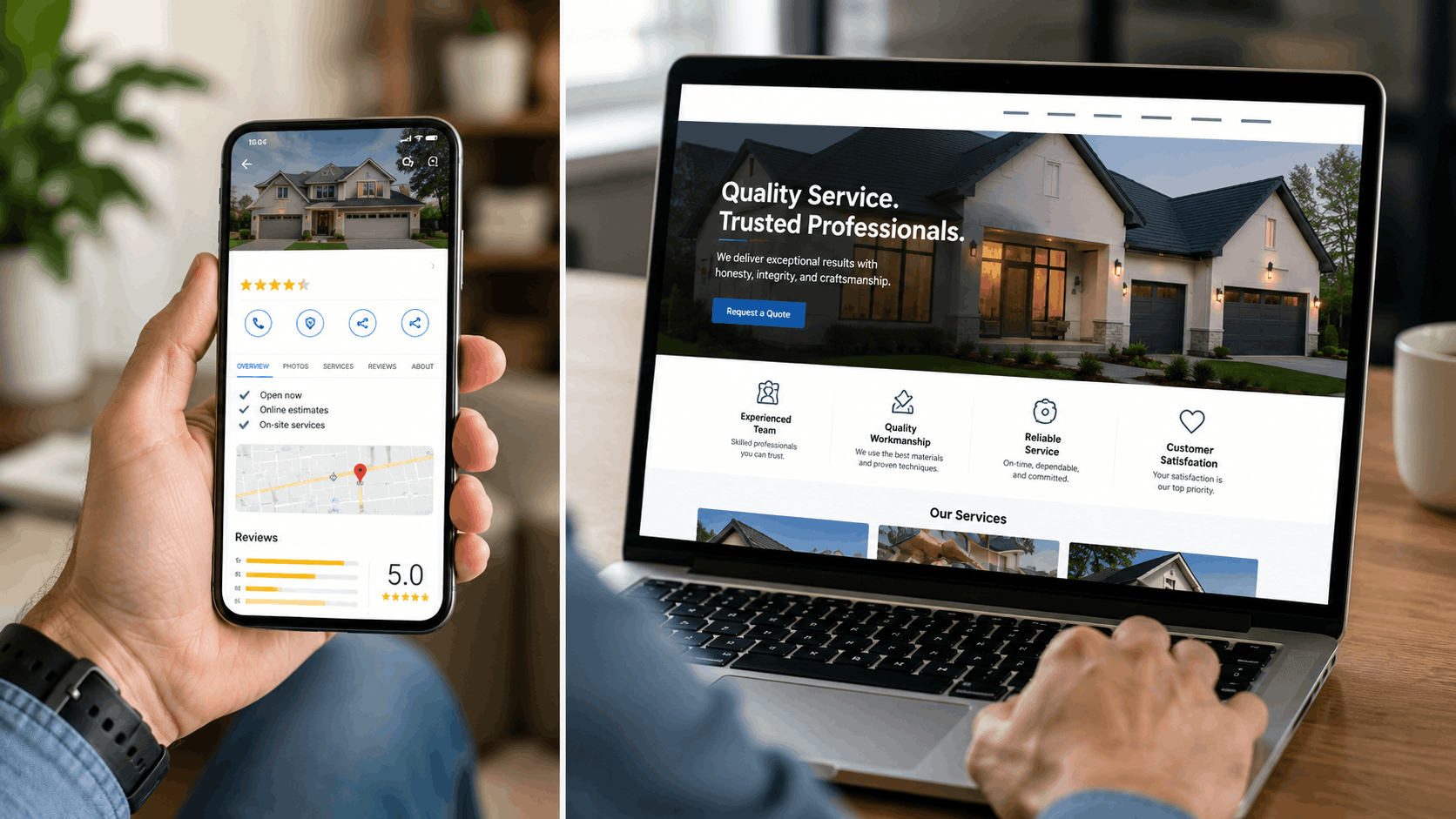
Google Business Profile on mobile beside contractor website on laptop showing reviews

Where Your Profile and Website Overlap

Name, address and phone number

Your business name, address or service area, and phone number should be exactly the same on your profile and your website. Google's guidelines say to use your real-world business name, without taglines, phone numbers or extra keywords, and to use a local phone number you control and your own website.

Hours, holiday schedules and service updates

When your hours change, update both on the same day. Google lets you set special hours for holidays and short closures, and recommends marking a business temporarily closed for longer closures. A customer who drives over because Google said you were open, or calls after your website said you were available, will not be happy, and may leave a review saying so.

Services

The services listed on your profile should match the service pages on your website. If you add a new service, add it to both. If you stop offering one, remove it from both.

Trust signals customers look for on both

Reviews, photos of real work, licenses and certifications, and clear contact details should appear on both platforms. Customers often check both before calling, and matching signals reassure them.

How Your Profile and Website Feed Each Other

Your profile sends searchers to your website

The website link on your profile is one of the most valuable links you have, because the people clicking it already searched for what you do near them. Point it at the page that best matches what your profile shows. For most businesses that is the homepage; for multi-location businesses, it should be the specific location page.

Your website helps Google trust your profile

Google's local ranking help page says prominence includes information from across the web. Your website is the most detailed source of information about your business that you control. Clear service pages, a list of the towns you serve and consistent contact details help Google confirm that your profile is accurate and relevant to more searches.

Structured data connects the two

Structured data is behind-the-scenes code that labels your business details for search engines. Google's LocalBusiness documentation requires only your name and address and recommends phone and hours. It helps Google read your website's details accurately and match them to your profile. It is not a ranking shortcut, and Google says structured data must match what is visible on the page.

Reviews work on both

Google reviews live on your profile, but you can feature selected reviews on your website, with the reviewer's permission where needed, and link to your Google review page so new customers can see the full picture. BrightLocal's 2026 survey found 54% of consumers visit a business's website after reading positive reviews, which shows how customers move from one to the other.

Photos and posts can do double duty

The same job photos can go on your profile and in your website gallery, with descriptive captions on the website. A seasonal offer can appear as a profile post and a section on your homepage. One piece of work, two places.

Storefronts vs Service-Area Businesses

How your profile and website pair up depends on whether customers come to you or you go to them.

Storefront businesses

Dentists, salons, restaurants, auto repair shops and retail stores have a real address customers visit. Their profile shows the address, a map pin and directions. The website should repeat the exact address, add parking and entrance details, embed a map, show photos of the building and front desk so people recognize it, and list hours clearly. A page about the neighborhoods you draw customers from helps too, but distance from the searcher plays a big part in the map results, so the address itself is central.

Service-area businesses

Plumbers, cleaners, landscapers, mobile detailers and other businesses that travel to customers hide their address on the profile and list service areas instead. Because the profile can show only up to 20 service areas and no detail about them, the website does more of the work here. A clear list of towns served, plus pages for the main ones with real local detail, tells customers and Google exactly where you work. Google's spam policies warn against near-identical pages that only swap the town name, so each town page needs genuine substance, such as neighborhoods, local conditions and recent jobs.

Hybrid businesses

Some businesses do both, such as a shop that also offers on-site service. Google allows a storefront address and service areas on the same profile when customers are served at the address during listed hours. The website should explain both clearly: what customers can get at the location and where you travel for on-site work.

Business consultant showing Google Business Profile analytics dashboard on laptop to smiling client

Businesses With More Than One Location

Each real location with its own staff and hours can have its own profile. The website should have a separate page for each location, with that location's exact address, phone, hours, staff, photos and directions, and each profile's website link should point to its own location page rather than the homepage. This keeps every profile and page matched, so a customer who taps through from the downtown profile lands on the downtown page, not a generic homepage where they have to hunt for the right phone number.

Keep naming consistent across locations, such as "Business Name - Downtown," only if that matches how you present yourselves in the real world. Google's guidelines are strict about names, so do not add keywords to any location's name.

Using Profile Insights to Improve Your Website

Your profile's performance data and your website's Search Console data tell you what customers are looking for. Use them together:

  • Search terms on your profile show which phrases led people to your listing. If people find you for a service that has no page on your website, build one.
  • Search Console queries show which searches bring visitors to your website. If a page gets impressions but few clicks, improve its title and opening so it matches what people search.
  • Questions in reviews and calls reveal what customers want to know. Answer the common ones on your website's service pages.
  • Direction requests by area, where shown, hint at where customers come from. Those towns may deserve their own pages.

Over time, this loop, profile data pointing to website improvements and website content making the profile more relevant, is how the two platforms grow each other.

Protecting Yourself From Profile Problems

Because the profile is rented space, it makes sense to reduce the damage if something goes wrong:

  • Follow Google's guidelines exactly: real business name, accurate category, a real address or hidden address with service areas, no keyword stuffing.
  • Do not make big changes all at once, such as name, address and category on the same day. Google says some changes, like adding or changing a category or moving, can trigger re-verification.
  • Keep your own records: save your photos, service descriptions and review links outside Google.
  • Appeal properly if suspended: Google provides an appeal process and says not to create a new profile while an appeal is under review.
  • Keep your website strong, so customers can still find and contact you if your profile is ever unavailable.
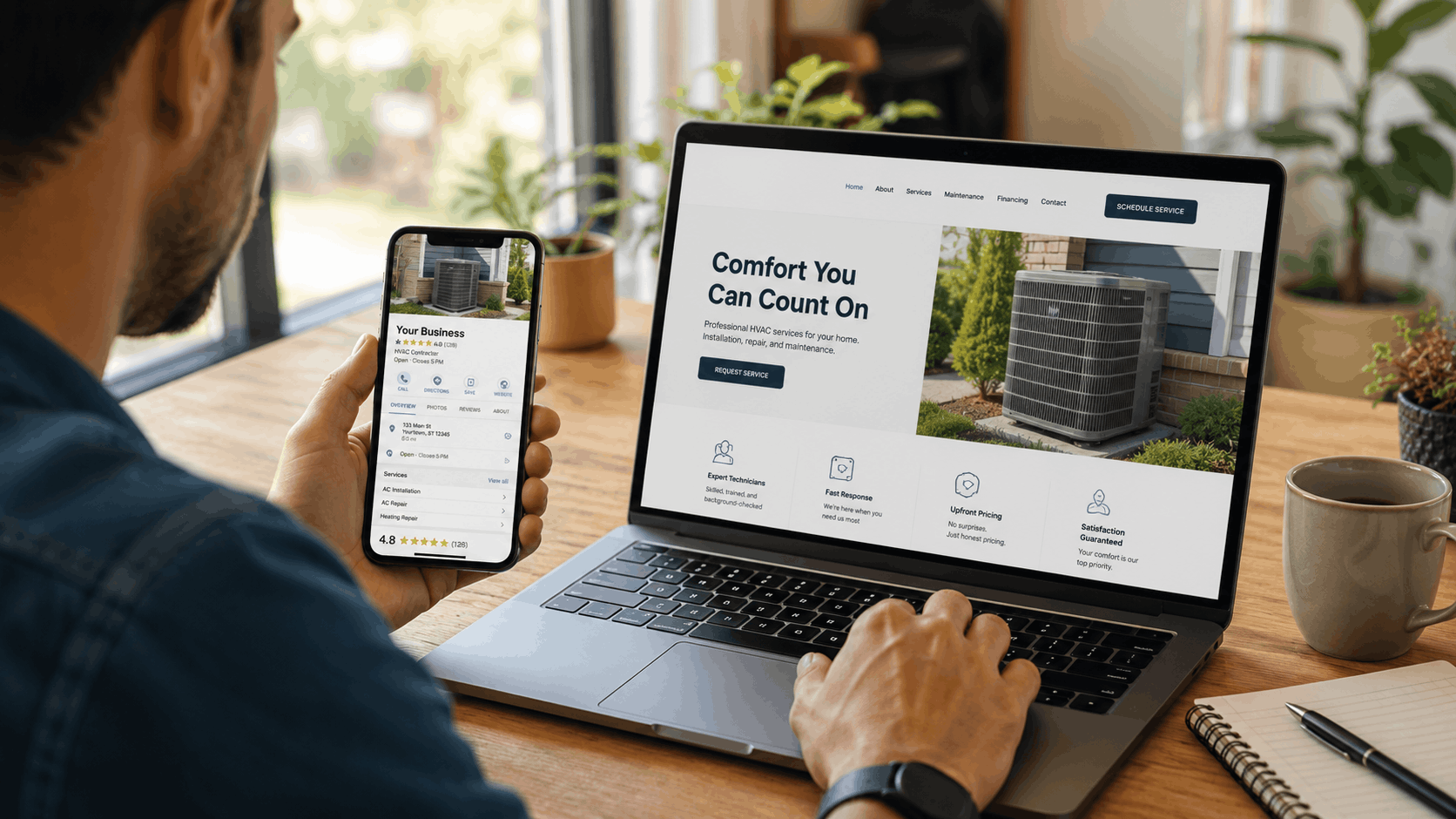
Man reviewing HVAC business Google Business Profile on phone beside professional website on laptop

Common Mistakes Local Businesses Make

Setting up the profile and never touching it again

Old photos, outdated hours, unanswered reviews and services you stopped offering make a profile look abandoned. Google says businesses with complete and accurate info are more likely to show up. Check your profile at least monthly.

Building a website with no local signals

A website that never says which towns you serve, only lists services in a single sentence and has no address or service area helps neither customers nor Google. Name your towns, give services their own pages and put your contact details in plain text.

Conflicting information between platforms

A different phone number on the website and profile, old hours on one of them, or a slightly different business name confuses customers and search engines. Moves, rebrands and new phone systems are the usual causes.

Stuffing keywords into the business name

Adding "Best Plumber Phoenix 24/7" to your profile name breaks Google's guidelines and can lead to suspension. Use your real business name exactly as it appears on your signage and paperwork.

Linking the profile to a weak page

Sending profile clicks to a slow page, a page with no phone number at the top or a social media page wastes your best visitors. Link to a fast page on your own website with a clear call button.

Creating extra profiles

Some owners create a profile for each town they serve. Google's service area help page says not to create extra profiles for one service area, and doing so can get profiles removed. Use service areas on one profile and town pages on your website instead.

Editing during verification

Google warns that editing your name, address or category while waiting for a postcard verification code can stop the code working, and requesting a second code cancels the first, according to its verification help page. Finish verification before making changes.

What Goes Where: A Practical Split

Some information belongs on both platforms, some works best on one.

Put on both, identically

  • Business name, phone number and address or service area.
  • Regular hours and holiday hours.
  • Your main services.
  • Real photos of your work, team and location.
  • A short description of what you do and where.

Best on your profile

  • Reviews and your replies to them.
  • Short posts about offers, events and seasonal updates.
  • Quick facts customers check before calling, such as attributes like wheelchair access or online estimates where Google offers them.

Best on your website

  • A detailed page for each service: what it is, signs you need it, the process, timing, price factors and FAQs.
  • A page for each main town with real local detail.
  • A full project gallery with captions.
  • Your story, team bios, licenses, insurance, warranties and policies.
  • Prices or price ranges, and how estimates work.
  • Contact forms, quote requests and booking tools.

Think of the profile as the sign out front and the website as the store inside. The sign gets people to stop; the store answers their questions and makes the sale.

Beyond Google: Other Listings That Should Match

Google is the biggest, but customers also find businesses through other maps and directories, and AI tools read them too. Keep these consistent with your website and Google profile:

  • Apple Business: free, and it controls your place card in Apple Maps, Safari and Spotlight. Apple Business replaced Apple Business Connect in April 2026, according to Apple.
  • Bing Places for Business: free, at bing.com/forbusiness, and it can import your Google profile details, according to Search Engine Journal.
  • Yelp: claiming your page is free at biz.yelp.com.
  • Industry directories: the reputable ones in your field, such as trade associations or professional boards.

The same rule applies everywhere: one name, one phone number, one set of hours, and a link back to your website.

Real estate agent showing local business map listings on tablet to client

Setting Up a Google Business Profile the Right Way

  1. Create or claim: go to business.google.com/add to add a new business, or search your business in Google Maps and choose "Claim this business." Google says it is free, according to its help page.
  2. Choose your primary category: the one that best describes what your business is, plus a few additional categories only if needed.
  3. Address or service area: storefronts list a real address; service-area businesses hide the address and add up to 20 service areas. P.O. boxes and virtual offices are not allowed.
  4. Verify: Google decides which methods you get, which may include phone or text, email, video call, postcard or a recorded video. Video recordings must be at least 30 seconds, one unedited take showing your location, business and proof you run it.
  5. Fill in everything: hours, holiday hours, phone, website, description, services and photos.

Google says edits usually take up to 10 minutes to review but can take up to 30 days, and that rankings for new businesses can take up to a month to appear. Fill in everything before expecting results.

A Simple Action Plan to Get Both Working Together

Step one: audit what you have

  • Search your business name on Google and open your profile. Note your category, hours, phone, website link, services, photos and latest review.
  • Open your website on your phone. Note the phone number, hours, address or service area, services listed and how quickly it loads.
  • Write down every difference between the two.

Step two: fill the gaps on both

  • Make name, phone, hours and service area identical.
  • Match the services on your profile to service pages on your website, and create pages for any that are missing.
  • Add recent photos to both.
  • Point your profile's website link to the best page.
  • Add a link to your Google reviews on your website.

Step three: build a monthly habit

  • Reply to new reviews.
  • Add a few new photos to your profile and website.
  • Check hours, especially before holidays.
  • Post an update or offer on your profile.
  • Check Google Search Console and your profile's performance data to see what is working.

How AI Tools Use Your Profile and Your Website

AI search tools add a new reason to keep both in sync. Google says its AI Overviews and AI Mode link to pages already in Google Search and that there are no additional requirements to appear, while advising businesses to keep Business Profile information up to date, according to its AI features guide. Google also lets apps built on Gemini pull live Maps details, including hours, ratings and reviews, on more than 250 million places. OpenAI says ChatGPT search can use a person's approximate location to find local results.

In other words, AI tools read your listings for quick facts and your website for detail. If the two disagree, an AI answer may repeat the wrong one. If both are complete and consistent, the tools have clear, matching facts to describe your business accurately. Only 3% of US adults in DreamHost's survey start a local search with AI, so this is a bonus on top of Google, not a replacement, but it rewards exactly the same work.

Two colleagues smiling while reviewing FAQ answers together on a laptop in office

Most profile clicks happen on phones. BrightLocal's 2026 data found 73% of local searches start on a mobile device. When someone taps your website link, the page needs to load quickly and show your phone number and main services immediately. Google treats 2.5 seconds or less as a good time for a page's main content to appear, and it crawls and ranks the mobile version of your site. A slow, cluttered page wastes the visitor your profile just sent you.

Three Example Businesses

A plumber with only a profile

Maria runs a two-truck plumbing company with a strong Google profile and 60 reviews, but no website. She shows up in the map for "plumber near me" in her town, but rarely for "water heater replacement" or "sewer line repair," and never for the next town over. Customers comparing bigger jobs cannot find details about her work. Adding a website with a page for each service and each main town lets her appear for those searches and gives customers who find her profile somewhere to learn more.

A dentist with only a website

A new dental practice has a polished website but never claimed its Google profile. Patients searching "dentist near me" see competitors on the map, and some search results show an unclaimed listing with wrong hours. Claiming and verifying the profile, adding photos and asking every patient for a review puts the practice on the map, and the website gives those patients the detail they need.

A landscaper whose two platforms disagree

A landscaping company changed its phone number last year and updated the website, but not the profile. It also stopped offering snow removal, but the profile still lists it. Calls go to a dead number and winter callers get turned away. Fixing the profile in one afternoon recovers those calls and stops the frustrated reviews.

Measuring Whether It Is Working

  • Profile performance: Google shows how people found your profile and what they did, such as calls, direction requests and website clicks.
  • Google Search Console: free, and it shows which searches bring people to your website and which pages they land on.
  • Leads: track calls and form submissions from your website and profile over time.
  • Ask customers: "How did you find us?" remains one of the most reliable measures you have.

Google says crawling changes to your website can take from a few days to a few weeks, so give changes time before judging them.

How Grow Local Pairs a Website With Your Profile

Grow Local is a website builder for local business owners with no technical skills, supporting 104 industries. You answer simple questions about your services, towns, hours and branding, and AI builds the site. A preview builds while you answer, and after payment the full site is usually ready within a few minutes.

Every site connects to your Google Business Profile and includes hosting, SSL, backups, a custom domain and a mobile-responsive design, with 50 or more pages, including AI-written service pages to match the services on your profile and a location page for each town you serve. Your business info is entered once and used across the site, which keeps your name, phone and hours consistent. The dashboard lets you update services, hours and phone, see call clicks and form leads, and download PDF SEO reports. It costs $99 a month on one plan with no contract and no setup fee, and you can preview the full site before paying. It cannot guarantee rankings or leads.

Frequently Asked Questions

Do I really need a website if I already have a Google Business Profile?

Yes. A profile gets you on the map, but you do not own it, it has limited space and Google can suspend it. A website lets you explain every service and town, capture leads in more ways and show up for more searches. In DreamHost's survey, 69% said a website is essential for a local business to be credible.

Can a Google Business Profile rank without a website?

It can appear in the map results, but Google's local ranking considers relevance and prominence, including information from across the web. A website gives Google much more information to work with and helps you appear for more specific searches.

What is the difference between Google Business Profile SEO and website SEO?

Profile SEO is about appearing in the map and local results: category, completeness, reviews and distance. Website SEO is about ranking pages in regular results for specific searches: helpful service and town pages, clear structure and a fast mobile site. They support each other.

How often should I update my Google Business Profile?

Whenever something changes, and check it at least monthly: reply to reviews, add photos, confirm hours and post an update.

What should the website link on my profile point to?

Usually your homepage. If you have multiple locations, link each profile to its own location page. Make sure the page loads fast and shows your phone number at the top.

Does a faster website help my profile show up more?

Google does not say website speed directly affects map rankings. A fast site does keep the visitors your profile sends, which matters more. Google treats 2.5 seconds or less as a good loading time for a page's main content.

What is NAP consistency and why does it matter?

NAP stands for name, address and phone number. Keeping them identical on your website, profile and other listings helps customers reach you and helps search engines trust your details.

Can I still use Google's free website builder?

No. Google shut down Business Profile websites in 2024. You need a website on your own domain.

How do reviews on my profile and website work together?

Collect reviews on your Google profile, feature selected ones on your website and link to your Google review page. Many customers read reviews, then visit the website before deciding.

Do I need structured data on my website?

It is helpful but not required. Google's LocalBusiness structured data labels your name, address, phone and hours so search engines read them accurately. It must match what is visible on the page and is not a ranking shortcut.

Should I create a profile for each town I serve?

No. Google says not to create extra profiles for one service area. Use the service area setting on one profile, and build town pages on your website.

Which matters more, my profile or my website?

Neither replaces the other. The profile matters most for "near me" map searches and quick trust through reviews. The website matters most for specific searches, detailed comparisons, AI answers and lead capture. Most local businesses need both working together.

What happens if my profile gets suspended?

Google says the public cannot see a suspended profile and the owner cannot manage it until an appeal succeeds. Your website keeps working, which is one reason not to rely on the profile alone. Appeal through Google's process and do not create a new profile while the appeal is under review.

How long does it take to see results from using both together?

Google says new business rankings can take up to a month to appear and website changes can take days to weeks to be crawled. Most businesses see steady improvement over a few months of consistent work.
Final Thoughts

Your Google Business Profile and your website are not competitors. The profile gets you found nearby and builds quick trust with reviews and photos. The website explains, persuades, captures leads and gives you a home base you own. Together, with matching details and regular updates, they cover far more searches and turn far more visitors into customers than either one alone.

Start with the audit above: compare your profile and website side by side, fix every difference and build a monthly habit. If you need a website that pairs with your profile without building it yourself, you can start a free Grow Local preview and see the full site before paying anything.

Grow Local Team

Written by Grow Local Team

Editorial

Grow Local helps local service businesses build SEO-ready sites and grow online.

Ready to improve your local visibility?

Get started now and discover local opportunities you're missing.

Get Started Now

No commitment, cancel anytime